API Instrumentation
In addition to interrupts, SystemView can also trace regular C functions. This is useful for monitoring execution flow, function timing, and parameter values.
As an example, consider the WDOGn_Feed() function, which is periodically called to refresh the watchdog timer every 1 sec. To instrument this function, SystemView recording calls are added at the function entry and exit points. Each function is identified by an application-defined event ID in the range 32–511.
#define APP_EVTID_WDOGn_Feed    32

extern void SEGGER_SYSVIEW_RecordU32(unsigned int, uint32_t);
extern void SEGGER_SYSVIEW_RecordEndCall(unsigned int);

void WDOGn_Feed(WDOG_TypeDef *wdog)
{
  SEGGER_SYSVIEW_RecordU32(APP_EVTID_WDOGn_Feed, (uint32_t)wdog);

  // ... body of the function ...

  SEGGER_SYSVIEW_RecordEndCall(APP_EVTID_WDOGn_Feed);
}
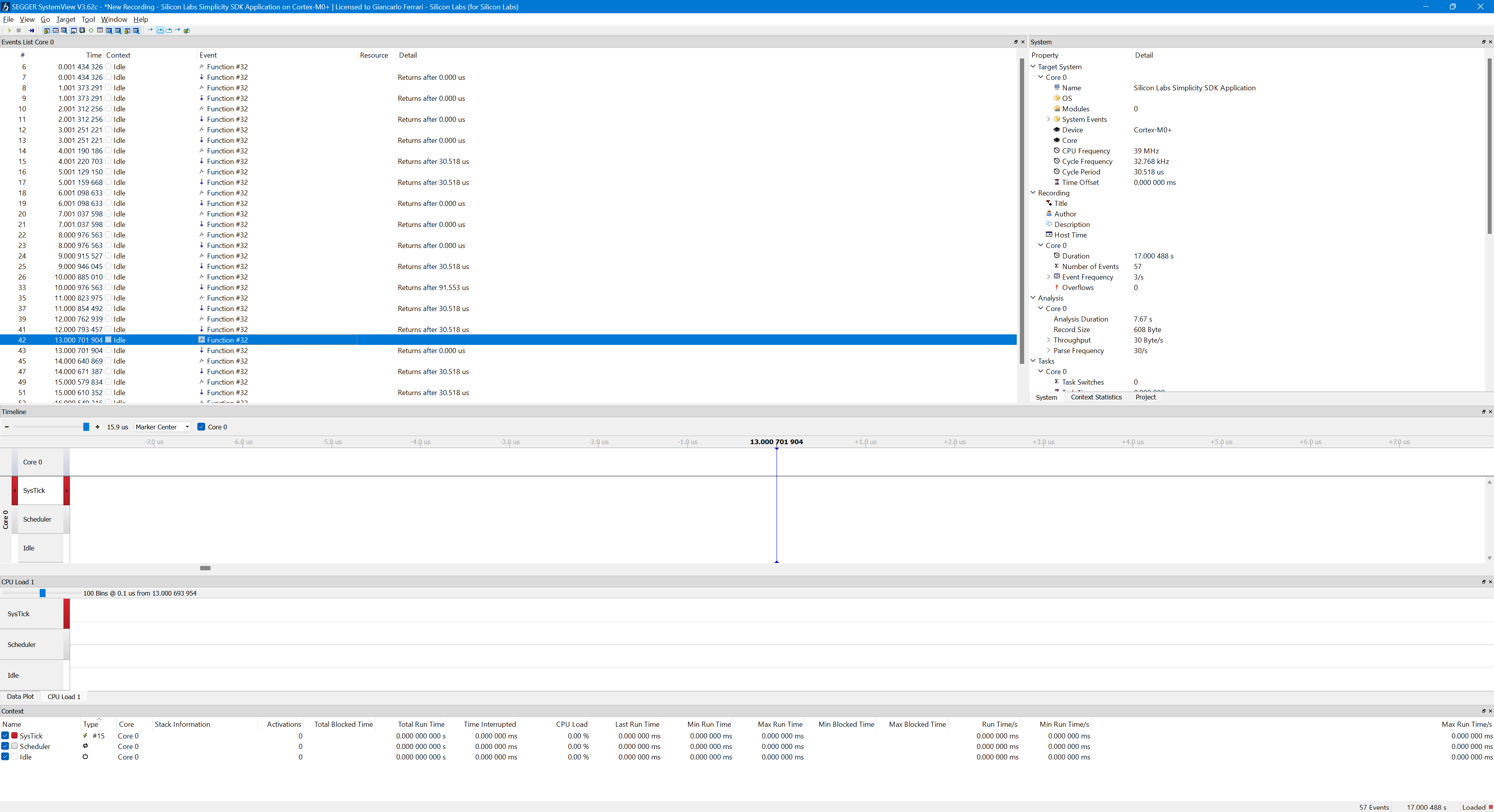
In the SystemView timeline, both the function call and return are visible. However, in the Events List window, the event appears only as "Function #32", in the context of idle, without any additional information.
To associate event IDs with function names and to decode function arguments (and return values), a SystemView description file should be provided. Create a file named SYSVIEW_noOS.txt under:
This file defines API names and argument formats as shown below:
######################
#  SYSVIEW_noOS.txt  #
######################
#
# Types
NamedType Hex   *=%p

# API IDs
32    WDOGn_Feed    wdog=%Hex
Note: The syntax and capabilities of the SystemView description language are documented in the official SystemView User Guide.
The target must then notify the host which description file to use. This is done by adding the following line to the _cbSendSystemDesc() function (see SEGGER_SYSVIEW_Init.c):
static void _cbSendSystemDesc(void) {
  SEGGER_SYSVIEW_SendSysDesc("N="SYSVIEW_APP_NAME",D="SYSVIEW_DEVICE_NAME);
  SEGGER_SYSVIEW_SendSysDesc("I#15=SysTick");

  // API reference to "SYSVIEW_noOS.txt"
  SEGGER_SYSVIEW_SendSysDesc("O=noOS");

#if defined(SYSVIEW_KERNEL_MICRIUM_OS)
  SEGGER_SYSVIEW_SendSysDesc("O=Micrium OS Kernel");
#elif defined(SYSVIEW_KERNEL_FREERTOS)
  SEGGER_SYSVIEW_SendSysDesc("O=FreeRTOS");
#endif
}
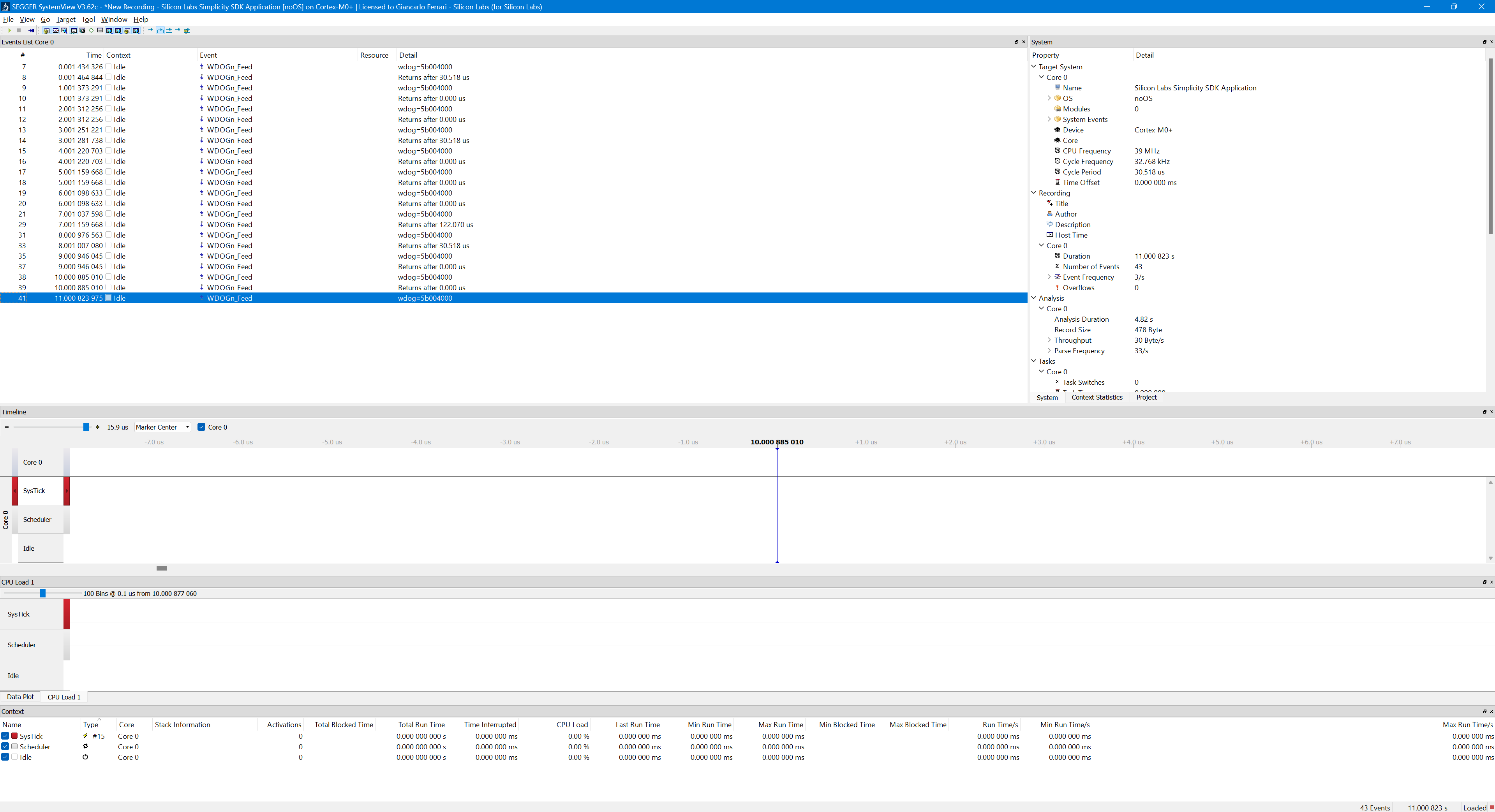
After restarting the trace capture, SystemView correctly displays the function name and the decoded argument value (shown as a hexadecimal pointer).